Lead routing is an automated function within Aimbase that assigns incoming leads to the most appropriate dealer. When leads enter the platform—either through API or file import—Aimbase evaluates key data points such as country, zip/postal code, brand, and other configured criteria to determine the best dealer match.
Aimbase supports multiple lead routing methods that can be used individually or in combination to control how leads are distributed across your dealer network.
Available Lead Routing Methods
- Radius Routing
- Drive Distance Routing
- Territory Routing
- Product Routing
- Lead Re-routing
- Inventory Routing
- Pre-assignment
Each method is described in detail below.
1. Radius Routing
What is Radius Routing?
Radius Routing is the most basic and foundational method of lead routing within Aimbase. It is used to determine the closest dealer to a lead based on geographic distance and is applied in nearly all routing scenarios unless explicitly disabled.

How does Radius Routing work?
Radius Routing calculates the distance between:
- The center point of the lead’s zip/postal code, and
- The latitude/longitude coordinates of each active dealer
Using this calculation, Aimbase identifies the dealer that is geographically closest to the lead using a straight-line (“as the crow flies”) distance.
Key details:
- Radius Routing is always applied unless disabled at the instance level
- It is commonly used alongside other routing methods (such as Territory, Product, or Inventory) to determine the final dealer assignment
- The default maximum routing radius is 1,500 miles
- If no dealers fall within the defined radius, the lead is assigned to the default dealer
For international leads:
- Radius Routing must be explicitly enabled
- Only dealers within the same country as the lead are considered
- If no eligible dealer exists in that country, the lead is assigned to the default dealer
Key Considerations
- Radius Routing is typically used as the final step in determining the closest dealer after other routing filters are applied
- The accuracy of routing depends on valid and complete zip/postal code data on the lead
- Radius values can be configured based on OEM requirements
- This method provides a simple and efficient way to ensure leads are routed to the nearest dealer geographically
When is Radius Routing used?
Radius Routing is used:
- As the default routing method for all leads
- In combination with other routing methods to determine the closest eligible dealer
- As a fallback when other routing methods do not result in a valid dealer match
2. Drive Distance Routing

What is Drive Distance Routing?
Drive Distance Routing is an advanced lead routing method that assigns leads to the dealer with the shortest actual driving distance, rather than using straight-line (“as the crow flies”) distance.
This method provides a more accurate representation of real-world proximity by accounting for roads, geography, and travel paths.
How does Drive Distance Routing work?
When enabled, Drive Distance Routing replaces standard radius-based distance calculations and determines the closest dealer based on estimated driving distance.
The process works as follows:
- Aimbase first identifies a set of nearby dealers using standard radius (“as the crow flies”) logic
- These dealers, along with the lead’s full physical address, are evaluated using a distance calculation service
- The lead is assigned to the dealer with the shortest drive distance
Key details:
- Requires a full physical mailing address on the lead
- If a complete address is not available or cannot be validated, Aimbase will fall back to Radius Routing
- This method is only available for leads in the United States and Canada
- When enabled, it replaces radius as the primary distance calculation method (unless fallback is required)
Key Considerations
- Drive Distance Routing must be specifically enabled and may include additional cost due to external distance calculation services
- It is typically used as the final step in routing after other filters (such as Territory, Product, or Inventory) are applied
- Re-routing (if enabled) will also use drive distance to determine the next best dealer
- Accuracy depends on complete and valid address data being provided with the lead
When is Drive Distance Routing used?
Drive Distance Routing is used when:
- More precise, real-world distance calculations are needed
- Geographic factors (such as highways, water, or terrain) may impact dealer accessibility
- Leads consistently include full physical address information
This method is ideal for improving routing accuracy in regions where straight-line distance does not reflect actual travel distance.
3. Territory Routing

What is Territory Routing?
Territory Routing is a method of lead routing that assigns leads to dealers based on predefined geographic areas of responsibility. These areas determine which dealers are eligible to receive leads from specific regions.
Territories are most commonly used in combination with distance-based routing methods (Radius or Drive Distance) to ensure leads are assigned to the appropriate dealer within a defined geographic region.
How does Territory Routing work?
When Territory Routing is configured, Aimbase first determines which dealers are eligible to receive a lead based on the geographic area associated with the lead’s zip/postal code.
Territories can be assigned at multiple levels, including:
- Zip/Postal Code
- County
- State/Province
- Country
Once eligible dealers are identified:
- If only one dealer is assigned to the territory, the lead is routed directly to that dealer
- If multiple dealers share the same territory, Aimbase uses distance (Radius or Drive Distance) to assign the lead to the closest dealer
If no dealers are assigned to the territory:
- Aimbase falls back to standard distance-based routing across all eligible dealers
- If no dealers fall within the configured maximum radius, the lead is assigned to the default dealer
Dealer Territories vs. Brand Territories
Aimbase supports two types of territory assignments:
-
Territories (Dealer-Level):
Assigns geographic areas to a dealer across all brands they carry -
Brand Territories:
Allows different geographic areas of responsibility to be assigned per brand within the same dealership
Example:
- A dealer assigned the state of Missouri using Territories will receive leads for all brands they carry within that state
- If Brand Territories are used, each brand can have a different assigned region within the same dealership
For step-by-step instructions on configuring territories, refer to: How to Assign Areas of Responsibility to Dealers
Key Considerations
- Territory Routing acts as a filter, determining which dealers are eligible before distance is applied
- It is always used in combination with a distance-based method (Radius or Drive Distance) unless only one dealer qualifies
- Overlapping territories are supported; when overlaps occur, the closest dealer is selected
- Gaps in territory coverage are allowed and will fall back to distance-based routing
- Accurate dealer address data is critical for proper territory assignment
When is Territory Routing used?
Territory Routing is used when:
- Dealers have defined geographic areas of responsibility
- Business rules or contracts dictate where dealers can sell or service customers
- More control is needed over which dealers receive leads from specific regions
This method is especially useful for ensuring leads are routed in alignment with dealer agreements and market coverage strategies.
4. Product Routing

What is Product Routing?
Product Routing is a lead routing method that assigns leads to dealers based on the product of interest provided on the lead. This ensures that leads are only routed to dealers who carry or are assigned to the specific product the customer is interested in.
This method is typically used in combination with distance-based routing (Radius or Drive Distance) to determine the closest eligible dealer.
How does Product Routing work?
When Product Routing is enabled, Aimbase evaluates the product associated with the lead and filters eligible dealers based on product assignments.
The process works as follows:
- The lead must include a product of interest
- Aimbase identifies dealers that are assigned to that product
- From the eligible dealers, the lead is assigned to the closest dealer using Radius or Drive Distance routing
Key details:
- Product assignments can be managed within Aimbase or via API
- Only dealers assigned to the specified product are considered eligible
- Distance-based routing is used to determine the final dealer selection
Key Considerations
- Product Routing must be specifically enabled
- All leads must include a valid product of interest for this method to function
- Product assignments must be kept up to date, especially during:
- New model year releases
- Product lineup changes
- This method acts as a filter, and must be used in combination with a distance-based routing method
- Missing or incorrect product data will prevent leads from routing successfully
When is Product Routing used?
Product Routing is used when:
- Dealers carry different product lines or models
- Leads must be routed only to dealers that offer the requested product
- Greater control is needed to align lead distribution with product availability
This method is especially useful for ensuring leads are routed to dealers who can fulfill the customer’s specific product interest.
5. Lead Re-routing
What is Lead Re-routing?
Lead Re-routing is a feature that automatically reassigns a lead to another dealer if the originally assigned dealer does not view or acknowledge the lead within a specified timeframe.
This ensures that leads are not left unworked and continue to move through the dealer network until they are addressed.
How does Lead Re-routing work?
When Lead Re-routing is enabled, Aimbase monitors each assigned lead for dealer engagement.
A lead is considered unacknowledged if the dealer does not:
- Click the link in the lead notification email
- Open the lead within Aimbase
- Acknowledge the lead through a connected CRM
If the lead is not acknowledged within the configured timeframe:
- Aimbase reassigns the lead to the next best matching dealer
- The system uses the same routing logic (Territory, Product, Inventory, and Distance) to determine the next dealer
- This process continues sequentially based on dealer ranking
After the configured number of re-routing attempts:
- The lead is assigned to the default dealer
Key Considerations
- Lead Re-routing must be specifically enabled
- The number of re-routing attempts and timing thresholds are configurable by the OEM
- Time thresholds can be defined in minutes, hours, or days
- Specific days can be excluded from re-routing (such as weekends). However, the re-routing timer continues running during those days. If a lead reaches the re-routing threshold on an excluded day, the reassignment will occur at the same time on the next eligible day—provided the lead has not already been viewed.
- Each reassignment follows the same routing logic used in the initial assignment
- This feature can impact:
- Reporting and analytics
- CRM integrations
- Email notifications and nurture workflows
6. Inventory Routing

What is Inventory Routing?
Inventory Routing is a lead routing method that assigns leads to dealers based on available inventory and proximity. This ensures that leads are prioritized for dealers who currently have relevant inventory in stock that matches the customer’s interest.
This method uses real-time inventory data and is typically used in combination with distance-based routing (Radius or Drive Distance) to determine the closest eligible dealer.
How does Inventory Routing work?
When Inventory Routing is enabled, Aimbase evaluates dealer inventory to determine which dealers have units that match the lead’s product of interest.
The process works as follows:
- The lead must include product information
- Aimbase identifies dealers with matching available inventory
- From those dealers, the lead is assigned to the closest dealer using Radius or Drive Distance routing
Matching criteria can be configured based on business needs (e.g., model, trim, or other attributes).
If no dealers have matching inventory within the acceptable radius:
- The lead is routed to the closest dealer, regardless of inventory availability
Re-routing Behavior
Inventory Routing can be used with Lead Re-routing enabled or disabled.
When re-routing is enabled:
- Leads are first re-routed to the next closest dealer with matching inventory
- If no additional dealers have matching inventory, the lead is then routed to the next closest dealer regardless of inventory
This ensures that inventory-qualified dealers are prioritized while still preventing leads from going unworked.
Key Considerations
- Inventory Routing must be specifically enabled and requires an active inventory program
- Inventory data is sourced from dealer inventory feeds and must be accurate and up to date
- Only dealers with active and valid inventory are considered for routing
- This method acts as a filter, and must be used in combination with a distance-based routing method
- Matching logic is configurable based on OEM requirements
- Product information must be included on the lead for inventory matching to occur
When is Inventory Routing used?
Inventory Routing is used when:
- Dealers maintain active, trackable inventory feeds
- Leads should be routed to dealers who currently have relevant units available
- Increasing conversion likelihood by matching customer interest with available inventory is a priority
This method is especially effective for ensuring leads are routed to dealers who are best positioned to fulfill the customer’s immediate needs.
7. Pre-assignment

What is Pre-assignment?
Pre-assignment is a lead routing method where a lead is sent into Aimbase with a specific dealer already assigned. When this occurs, Aimbase bypasses all standard routing logic and assigns the lead directly to the designated dealer.
This ensures that the lead is delivered exactly to the intended dealer without being evaluated against any other routing rules.
How does Pre-assignment work?
When a lead is received with a dealer identifier:
- Aimbase skips all routing logic, including:
- Territory Routing
- Product Routing
- Inventory Routing
- Radius or Drive Distance calculations
- The lead is assigned directly to the specified dealer
Common use cases include:
- Dealer locator submissions (e.g., “Contact This Dealer”)
- Leads tied to a specific dealer through website interactions
Key Considerations
- Pre-assignment overrides all other routing methods
- Leads will not be evaluated against any routing rules once a dealer is specified
- Leads assigned this way will display a Dealer Match Type of “Pre-assigned”
- Lead Re-routing does not apply to pre-assigned leads
When is Pre-assignment used?
Pre-assignment is used when:
- A customer intentionally selects a specific dealer
- The source of the lead already determines the correct dealer
- Routing logic should be bypassed to ensure direct delivery
This method is ideal for scenarios where the dealer assignment is known at the time the lead is created.
What are General Rules Related to Lead Routing?
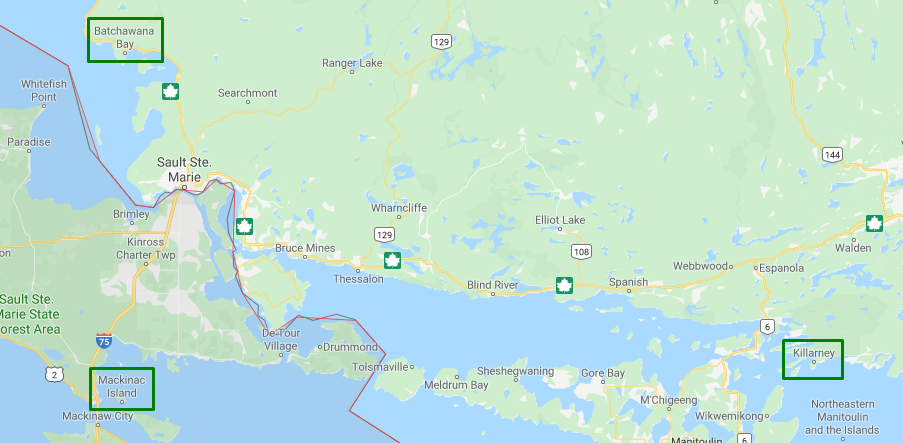
1. Lead routing doesn’t cross country lines. Example: There are dealer locations Mackinac Island, Michigan and Killarney, Ontario. A lead from a customer in Batchawana Bay, Ontario goes through the lead routing process and gets assigned to the dealer in Killarney, Ontario. This happens because even though the dealer in Mackinac Island is closer, it is in a different country.
2. In the U.S., leads routed with the ‘closest dealer’ logic are calculated “as the crow flies”. Example: Dealer A is 15 miles point-to-point from the lead and 25 miles driving distance. Dealer B is 18 miles point-to-point from the lead and 20 miles driving distance. The lead will be assigned to Dealer A even though the driving distance is further, because “as the crow flies” it is the closer dealer to the lead.
3. A prospect’s distance from a dealer is calculated based upon the center point of the zip code associated to the lead. When a lead is created within Aimbase, the system calculates the latitude-longitude of the center point of the postal/zip code provided by the prospect. Once this is determined, Aimbase uses the latitude-longitude from the calculation to determine which dealer is closest based on the latitude-longitude on each ‘Active for Sales’ dealer.
4. When territories are assigned to more than one dealer, the dealer with the assignment who is geographically closest to the zip/postal code on the lead will be assigned to the lead. Zip/postal codes cannot be shared by two dealerships. Most countries outside of the U.S. and Canada cannot be shared by more than one dealer.
What is the Relationship to Dealer Locators?
If you’re using the Aimbase dealer locate API to feed the Find a Dealer feature on your website, the results on this locator will mimic how the lead would be assigned to a dealer in Aimbase. The logic for both is the same and cannot be configured to operate on different sets of rules.
What are Exceptions of Lead Routing Rules?
When leads are sent to Aimbase with the dealer pre-assigned to them, all steps (listed above) normally taken to determine the best dealer for the lead are skipped. Leads enter Aimbase either by file import or API. On these files is a field that allows a lead to be manually assigned to a dealer. This is done simply by passing a dealer number into Aimbase with the rest of the lead information. When this happens, Aimbase skips all other steps related to routing the lead to a dealer and assigns the lead to the dealer included in its details.
Example Scenarios:
Lead is entered by a user from the dealer locator - In some instances, a manufacturer might choose for a consumer to see a “Contact This Dealer” call to action on the results of a dealer search. Often when this feature is available, the website will record the dealer number of the dealer clicked and pass it with the lead information into Aimbase. This ensures that if the consumer provided an address more relevant to the location they need the dealer to be near and then enter a permanent/home address on the form, that the lead will still go to the dealer nearest to where its services are needed.
Historical data or third-party sources - When importing historical data or data that may have been assigned to a dealer in another system or during another process, it is common to insert the data into Aimbase with the pre-existing dealer assignment in-tact.
What are Lead Routing Questions?
In order to locate the information needed to answer your questions about why a lead routed to a dealer the way it did, there are a few key areas of Aimbase you'll want to make sure you can access on the lead details page:
- Lead Staging link/button on the lead details page.
- This will give you direct access to the page where the lead information was staged. From here you can see logging with additional details regarding how/why the lead was assigned to the dealer it was.
- Lead History link/button on the lead details page.
- This is helpful to reference as it holds information about changes that have been made to the lead since it was first staged. If a lead has changed hands from one dealer to another, you can find information about the event(s) here.
- Dealer Match Type
- This can be leveraged as a filter from the leads grid and is also a field on the lead details. This is helpful to provide insight into how lead routing took place most recently for this lead even before digging into the history.
- Territory: Lead fell within dealer’s assigned territory.
- Radius: Dealer is the closest to the lead as calculated by the center point of the lead's postal code. This is an "as the crow flies" calculation.
- Drive Distance: Lead was routed by radius but using a drive distance calculation rather than an "as the crow flies" calculation. (This is an optional feature that requires additional setup.)
- Default: The lead was assigned because the lead either fell outside the assignable dealer territory (white space) or the postal code/country code is invalid..
- Reassigned: The lead was manually assigned to the dealer.
- Pre-assigned: The lead was assigned to dealer upon entry to Aimbase.
- Dealer Group: The lead was assigned to the dealer because it is within a dealer group.
- Inventory: Closest dealer with matching inventory. (This is an optional feature which can only be enabled if the OEM is also running an inventory program.)
- Re-Route: A lead was automatically re-routed to the next closest dealership because the first dealer didn’t acknowledge the lead. (This is an optional feature that is set up with parameters set by OEM.)
- This can be leveraged as a filter from the leads grid and is also a field on the lead details. This is helpful to provide insight into how lead routing took place most recently for this lead even before digging into the history.

- Lead staging section under Imports.
- While you can get to a specific lead’s staging details directly from the lead details, this section of Aimbase is where those details live.

What are Steps to Finding Answers?
- Check the Dealer Match Type to determine if the value in the field addresses your question about lead routing.

2. Check the lead history to for more detail about what may have occurred with the lead's routing.

- Below is an example of one message you may see if something has changed with the lead's dealer assignment at some point. In the screenshot below, you can see where the history tells us that the lead entered Aimbase already assigned to the Testing Dealer. It later underwent a manual reassignment by a user through the system.

3. If nothing is there, use the staging link to get to the staging details.


4. What to look for in the staging log to get the answer.
Example 1: Lead with valid postal code is routed to a dealer based on the dealer being closest to the lead.

Example 2: Lead with invalid postal code is routed to the default dealer (also sometimes referred to as the corporate dealer). In the screenshot below the notable difference between the invalid and valid postal code is the lack of Aimbase appending a county based on the postal code. Because the postal code is invalid, a county cannot be appended. Note the clearly invalid postal code in the customer details to the left.

Example 3: Lead is assigned to a specific dealer that was selected before sending the lead to Aimbase.

FAQs
What is lead routing in Aimbase?
Lead routing in Aimbase is an automated function that assigns incoming leads—via API or file import—to the most appropriate dealer. When a lead enters the system, Aimbase references the country code and the lead’s zip/postal code to calculate a best match to one of the dealers, based on the brand assignments and other configured factors.
Why is lead routing important?
Because correct routing ensures that leads reach the right dealer in a timely manner, which improves conversion chances, avoids mis-assignment, and aligns with brand/dealer responsibilities. It also ensures consistency with how the website’s “Find a Dealer” locator works (if applicable).
What routing methods does Aimbase support?
Aimbase supports several methods (which can be used alone or in combination):
Radius routing: this is the most basic form and always used unless disabled. It calculates the distance between the lead’s postal code center-point and dealer lat/long coordinates.
Territory assignments: dealers can be assigned territories (zip/postal code, county, state/province, or country) to define their “area of responsibility.” Aimbase supports both general Territories and Brand-specific Territories (where each brand can have its own territory assignment within the same dealer).
Product assignments: (optional, less common) leads are assigned to dealers based on a specified product of interest. This requires customization, and leads must include product-of-interest data when sent.
Lead re-routing (automated reassignment): if enabled, leads can be automatically sent to the next best dealer if the first assigned dealer does not view the lead within a configured timeframe. At that point other routing logic continues.
How does radius routing work?
Radius routing calculates the distance between:
- The lead’s postal/zip code center‑point, and
- Each dealer’s exact latitude/longitude coordinates.
Additional notes:
- Default radius = 1,500 miles.
- U.S. and Canada radius routing is enabled by default.
- International radius routing must be explicitly enabled and only considers dealers within the same country.
- If no dealer exists in the lead’s country, the lead is routed to the default dealer.
How do territory assignments differ from radius routing?
Territory assignments define specific geographic responsibility for a dealer (by postal code, county, state/province, or country). When territories are assigned, they are typically layered on top of the radius logic.
Example: a dealer “John’s Recreation” sells brands Swiftsteer and Offroader. If you assign the state of Missouri using the Territories page, then the dealer will get leads for both brands in Missouri. Conversely, if you use the Brand Territories page, then each brand could have different territory assignments even within the same dealership.
What should I know about the product-assignment routing method?
Product assignment is less frequently used and must be explicitly enabled.
It requires that leads include the product of interest. Without that, the routing cannot apply.
It also needs maintenance when model years change, because product listings evolve.
What is lead re-routing, and when is it used?
When enabled, if a lead is assigned to a dealer and the dealer does not view the lead within a predefined timeframe, Aimbase will select the “next best match” dealer (based on the same routing logic) and assign the lead to them. Eventually after the configured number of dealer attempts, the lead may go to a default dealer.
The parameters that can be set by the OEM include:
Number of dealers a lead is allowed to be re-routed to before it goes to the default dealer.
The maximum minutes (or hours/days/weeks) a dealer is allowed the lead without viewing before reassignment.
On which days (if any) re-routing should not occur. Note: skipped days still count toward the allowed minutes time.
Because this function affects standard reports, dealer CRMs, dynamic autoresponders and nurture programs, it must be specifically requested/enabled.
What are the general rules related to routing that apply in Aimbase?
Lead routing doesn’t cross country lines. Example: even if a U.S. dealer is geographically closer than a Canadian dealer, a lead from Ontario will route to the Canadian dealer because country-line is respected.
In the U.S., the “closest dealer” logic uses straight-line (“as the crow flies”) distance, not driving distance. Example: Dealer A is 15 miles straight-line and 25 miles driving; Dealer B is 18 miles straight-line and 20 miles driving. The lead will go to Dealer A.
The distance calculation uses the center point of the lead’s postal/zip code.
When a territory is assigned to more than one dealer, the dealer with the assignment and the closest geographic distance to the lead’s zip/postal wins. Zip/postal codes cannot be shared by two dealerships; in most countries outside the U.S./Canada, dealers cannot share postal codes.
How does the routing logic relate to the “Dealer Locator” on a brand’s website?
If you are using Aimbase’s dealer locate API (for a “Find a Dealer” website feature), the API’s results will mimic the same routing logic that Aimbase uses for lead assignment. The logic is the same and cannot be configured separately.
What are the exceptions to the standard lead-routing rules in Aimbase?
One key exception is when the lead is sent into Aimbase with a dealer pre-assigned. In that case, all the routing logic steps (radius, territory, etc.) are skipped, and the lead goes straight to the specified dealer.
Examples of when this may occur:
A consumer on the website clicks “Contact This Dealer” and the website passes the dealer number with the lead.
Historical data imports or third-party sources where leads already had dealer assignments and are imported with that assignment intact.
How can I check why a particular lead was routed the way it was?
You can examine the following in Aimbase:
The Dealer Match Type field on the lead details page (and filterable in the leads grid). The types include: Territory, Radius, Drive Distance (if enabled), Default (when outside territory or invalid postal), Reassigned, Pre-assigned, Dealer Group, Inventory (optional) or Re-Route.
The Lead History link/button on the lead details page. This shows changes made to the lead since staging (e.g., dealer changes).
-
The Lead Staging link/button on the lead details page (or via Imports > Lead Staging). This shows the staging log and click-through details for how/routing decisions were made.
Steps to investigate:If you still need more detail, open the lead staging log to review the routing log entries.
-
Look for specific signs, for example:
A lead with a valid postal code routed via “Closest Dealer”.
A lead with an invalid postal code assigned to the default dealer (notice no county appended in the log).
A lead that was pre-assigned to a dealer and routing logic was bypassed.
What should I do if a lead was assigned to a dealer but that dealer didn’t view it and I want to understand the impact?
If the lead re-routing functionality is enabled, when a dealer fails to view a lead within the configured timeframe, the system moves the lead to the “next best match” dealer. In those cases, investigate:
Has the “Viewed” link in the lead notification email been clicked? If not, the system counts that as a non-view.
Has the assigned user accessed the lead details page (and does their email match the “Lead Emails To” contact type)? If not, the assignment is treated as “not viewed.”
What are the OEM configured thresholds: number of allowable re-routes, time-window, days to skip?
Because re-routing changes lead ownership, it can have downstream implications for reporting, CRM integrations, email autoresponders, nurture workflows, and dynamic content, so it must be carefully implemented.
What happens if a lead’s postal/zip code is invalid or falls outside assignable territory?
If the postal/zip code cannot resolve (e.g., county cannot be appended) or falls outside the assigned territory radius/territory region, then the lead is assigned to the default dealer (also referred to as the corporate dealer). Example: invalid postal code → no county appended → default dealer.
What are any country-specific nuances I should be aware of for lead routing?
Lead routing does not cross country boundaries. Even if a dealer across the border is closer, the lead stays within the lead’s country.
International radius routing is not enabled by default: an OEM must enable radius routing for international countries, and only dealers within the same country will be considered.
For distance calculations, in the U.S., “straight-line” distance is used unless a “drive distance” feature (optional) is configured.
What is the difference between “Territories” and “Brand Territories”?
“Territories” assign the geographic region to a dealer for all brands the dealer sells. Example: Dealer A sells Brand X and Brand Y; if State Z is assigned via Territories page, Dealer A receives leads for both brands in State Z.
“Brand Territories” allow each brand to have independent geographic assignments even within the same dealership. This means Brand X and Brand Y can have different regions for the same dealer.
What is the “default dealer” in Aimbase?
The default dealer is the dealer to which leads are assigned when none of the routing logic methods match or if leads fall outside configured geography, or if the lead’s country has no dealer (in international cases), or if the dealer fails view and exceeds re-routing thresholds. It acts as a catch-all.
If I’m using a “Find a Dealer” website feature via Aimbase dealer-locate API, do I need a separate routing logic?
No. The dealer-locate API uses the exact same routing logic as Aimbase’s lead-assignment system. The logic cannot be configured differently for the website vs lead assignment.
What fields or tools in Aimbase help support troubleshooting of lead routing?
For investigation you should use:
Dealer Match Type: this indicates how the lead was routed (Territory, Radius, Drive Distance, Default, Reassigned, Pre-assigned, Dealer Group, Inventory, Re-Route).
Lead History: shows changes to the lead’s assignment since staging.
Lead Staging/Lead Staging link: shows the staging log with detailed routing logic and why decisions were made.
What are any other considerations or warnings when using routing logic or enabling advanced features?
A few things to keep in mind:
If re-routing is enabled, it can affect reports, CRM integrations, dynamic content in autoresponders and nurture programs. It must be specifically requested and configured.
Product-based routing requires the leads to include product-of-interest information, and must be maintained each model year. Without that, leads may not route correctly.
Postal/zip code centroids are used for distance calculations, so in border or large-postal-area cases actual driving time may differ from “straight-line” distance. Be aware of this especially if you set strict radius thresholds.
For international countries, enabling radius routing and ensuring dealer country matches lead country are critical. Otherwise leads may stray to default.
Territory overlap: When multiple dealers cover the same territory, the closest dealer wins (by geographic center-point distance). Postal codes cannot be shared in many markets.